

Skip to content

A digital platform for Vihar Seva

Every Step
Counts.

A more organized way to record, manage and understand your Vihar Seva journey.

vSeva brings Vihar records, Sevak management, Sankalp progress and group coordination into one app for Captains and Sevaks, on your phone or in any browser.

Get it onGoogle Play

Create Group Already on vSeva? Login on the web

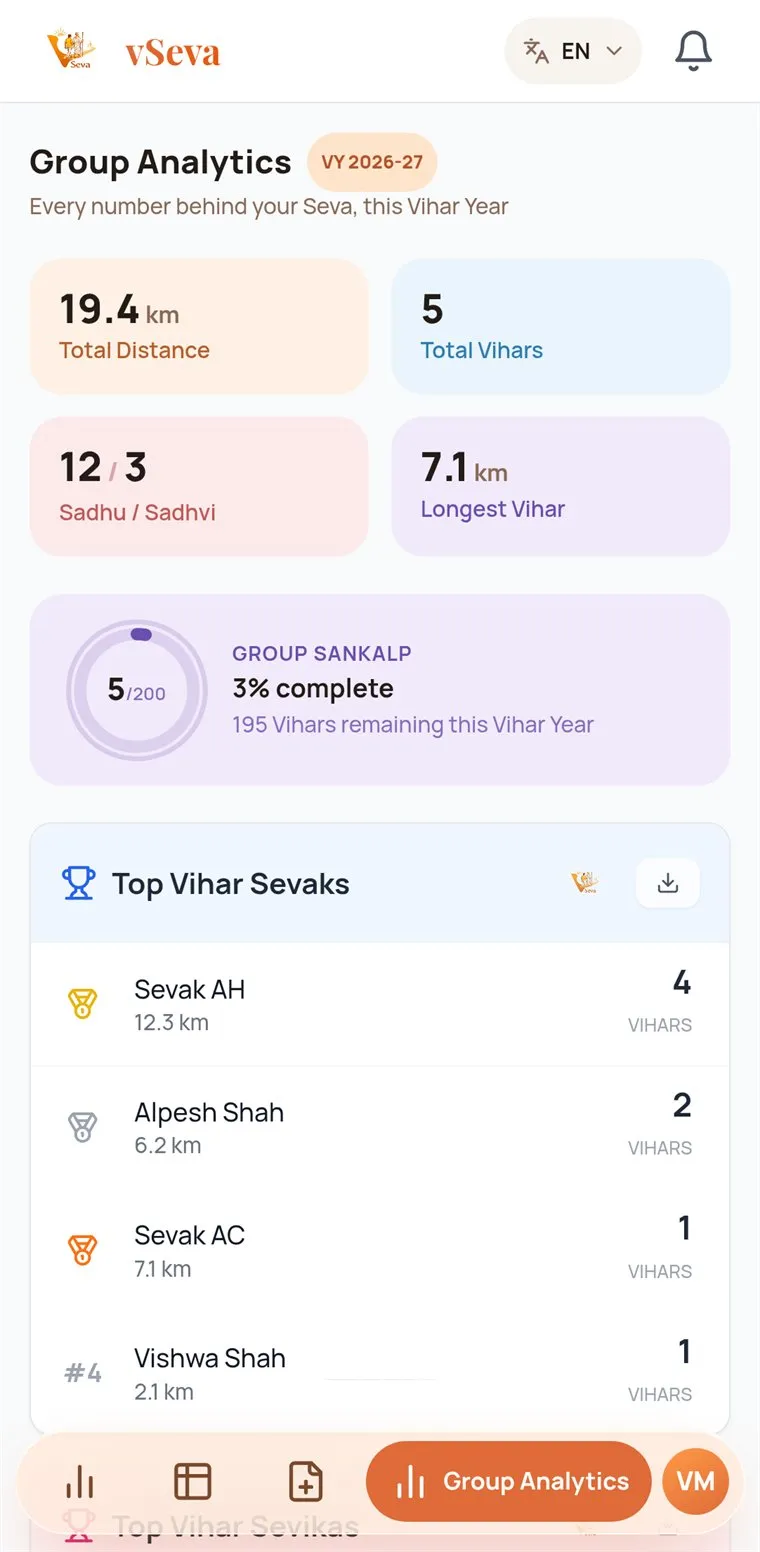
Group Analytics screen with total distance, Vihars, Group Sankalp and top Sevaks
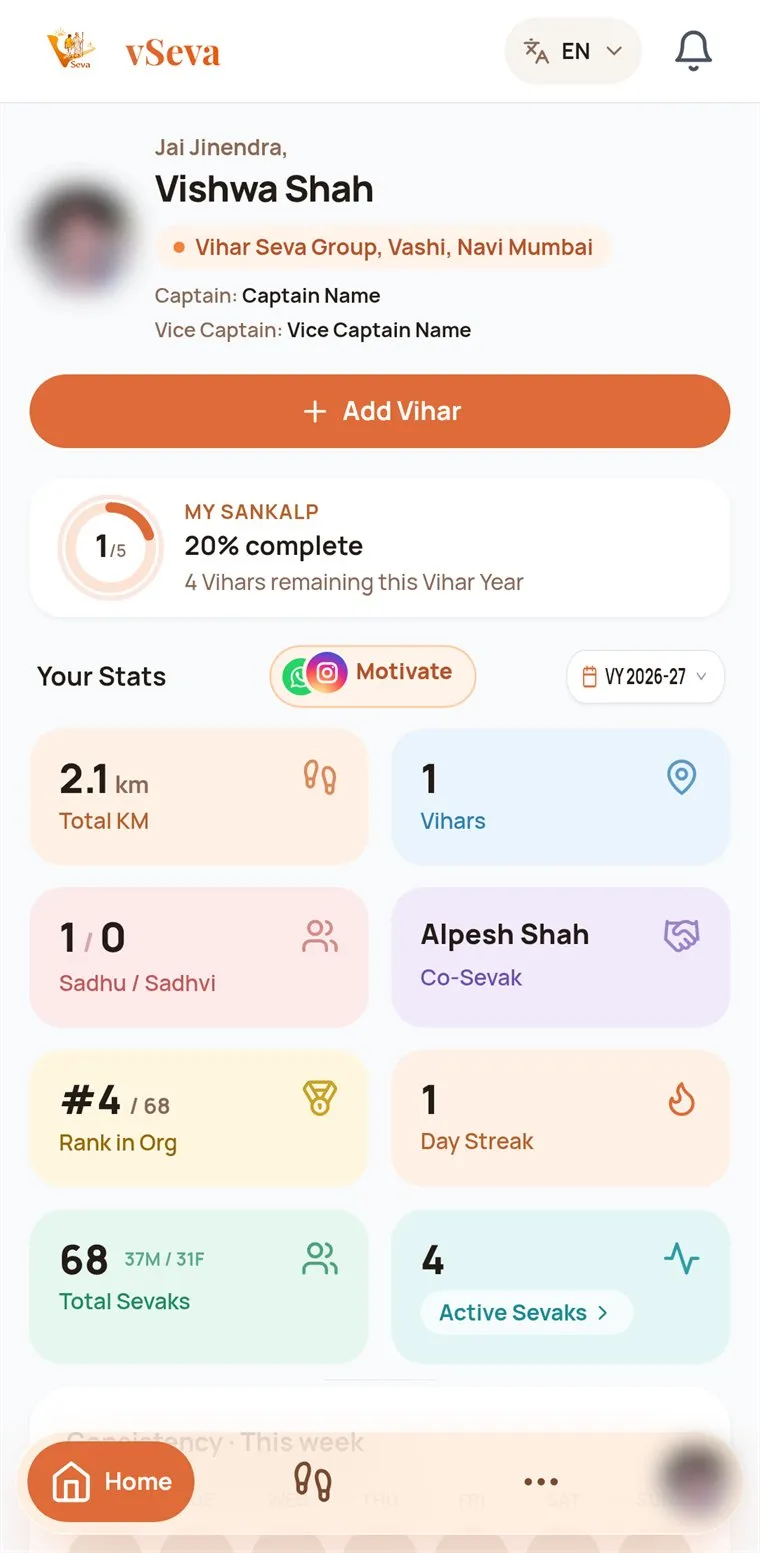
Sevak home screen in vSeva with the My Sankalp ring and Your Stats tiles
vSeva · now

Ramesh, No Vihar Since 5 Days

Chalo, agla Vihar saath mein karein!

Upcoming Vihar

Your Captain needs Sevaks

I’m Interested
  • Vihar records
  • Seva statistics
  • Sankalp progress
  • Sevak management
  • Captain approvals
  • Routes and distance
  • PDF and Excel reports
  • Important contacts
  • Upcoming Vihar alerts
  • Achievement cards
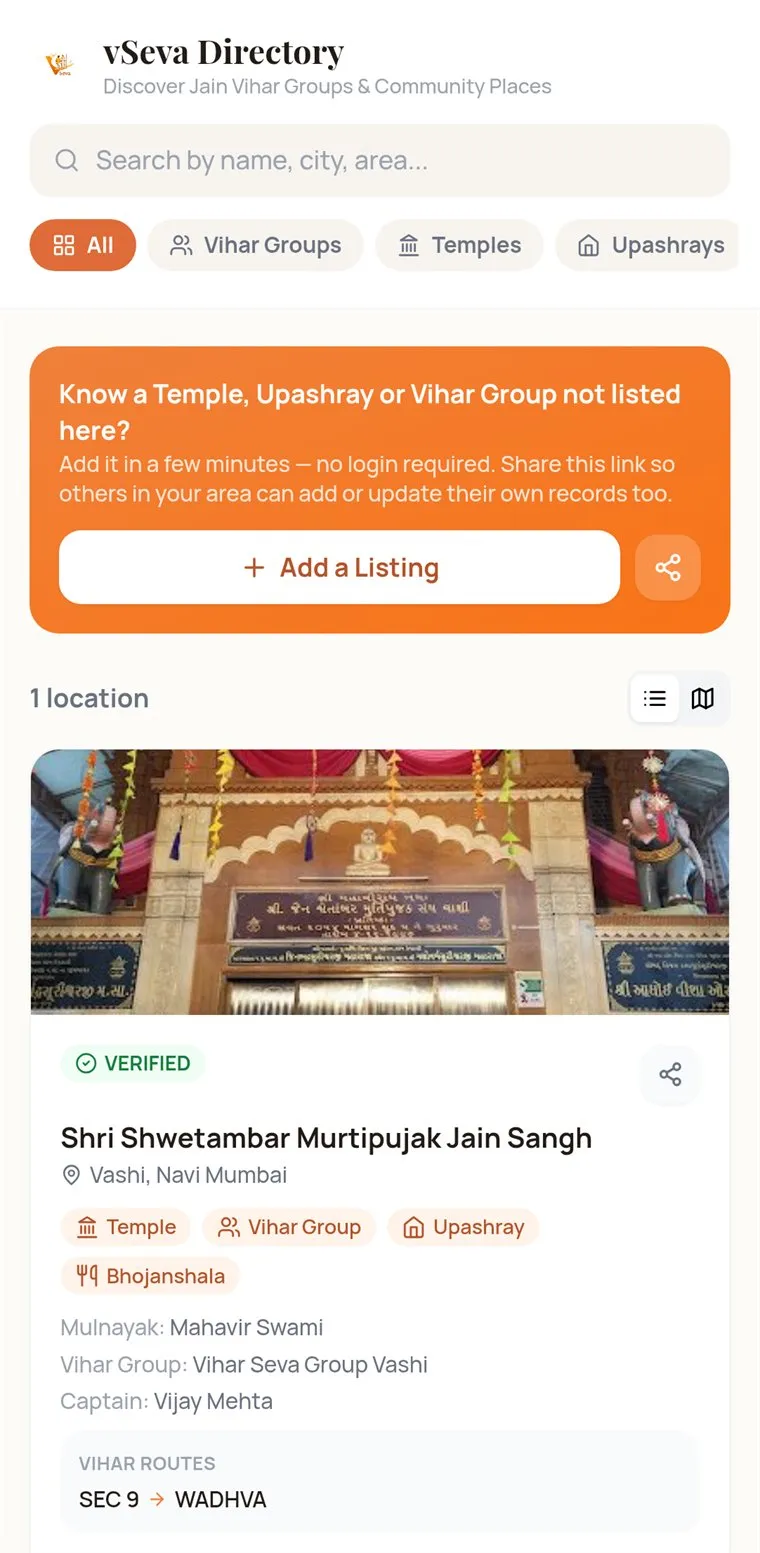
  • Community directory

So far

Counted the way a road counts.

Groups, Sevaks and Vihars already on vSeva, one milestone at a time.

  • Active Sevaks500+
  • Vihar Seva Groups10+
  • Vihars Recorded1000+

Where vSeva walks

Vihar Seva groups across India.

From Mumbai’s suburbs to Raipur and Ahmedabad. Tap a pin, or a group in the list, to see who walks there.

Our story

From a Google Form to a platform built around the Seva journey.

Vihar Seva means walking with Sadhu and Sadhvi Bhagwant from one place to the next. It takes coordination: who is walking, which route, and an accurate record of every journey.

vSeva started as a Google Form, a simple way to collect each Vihar. As the entries grew, so did the need: groups wanted to see their Sevaks, their routes, their kilometres and how the year was going, not just a list of rows.

So the form became a platform, with Vihar records, Sevak management, dashboards, statistics and the everyday workflows a Vihar Seva group runs on.
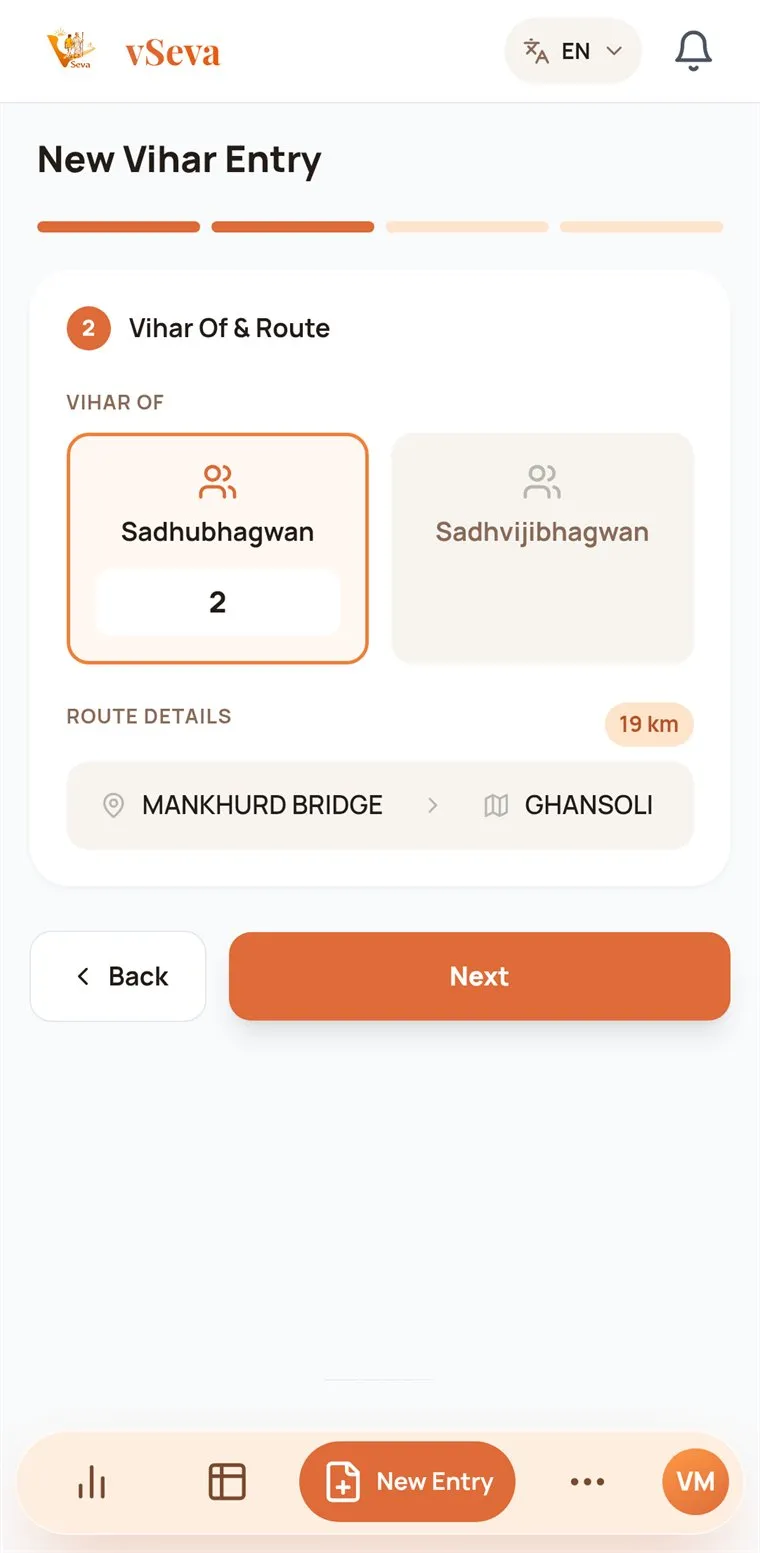
New Vihar Entry, step 2: Sadhubhagwan count and the From and To route
Left: what a form collects. Right: the same Vihar in vSeva, where the route sets the distance.
  1. Collect

    Every Vihar recorded in one place.

  2. Organize

    Sevaks, routes and contacts, kept by the Captain.

  3. Track

    Kilometres, Sankalp and the Vihar Year at a glance.

  4. Connect

    Alerts, VChat, contacts and Seva cards to share.
Features

Built for the way a Vihar Seva group actually works.

Two roles, one record. The Captain looks after the group; Sevaks record their Vihars and follow their own progress.

Vihar recording

Record a Vihar in four short steps.

Sevaks tap Add Vihar on Home; the Captain uses New Entry. One person submits each Vihar for everyone who walked.

How recording works
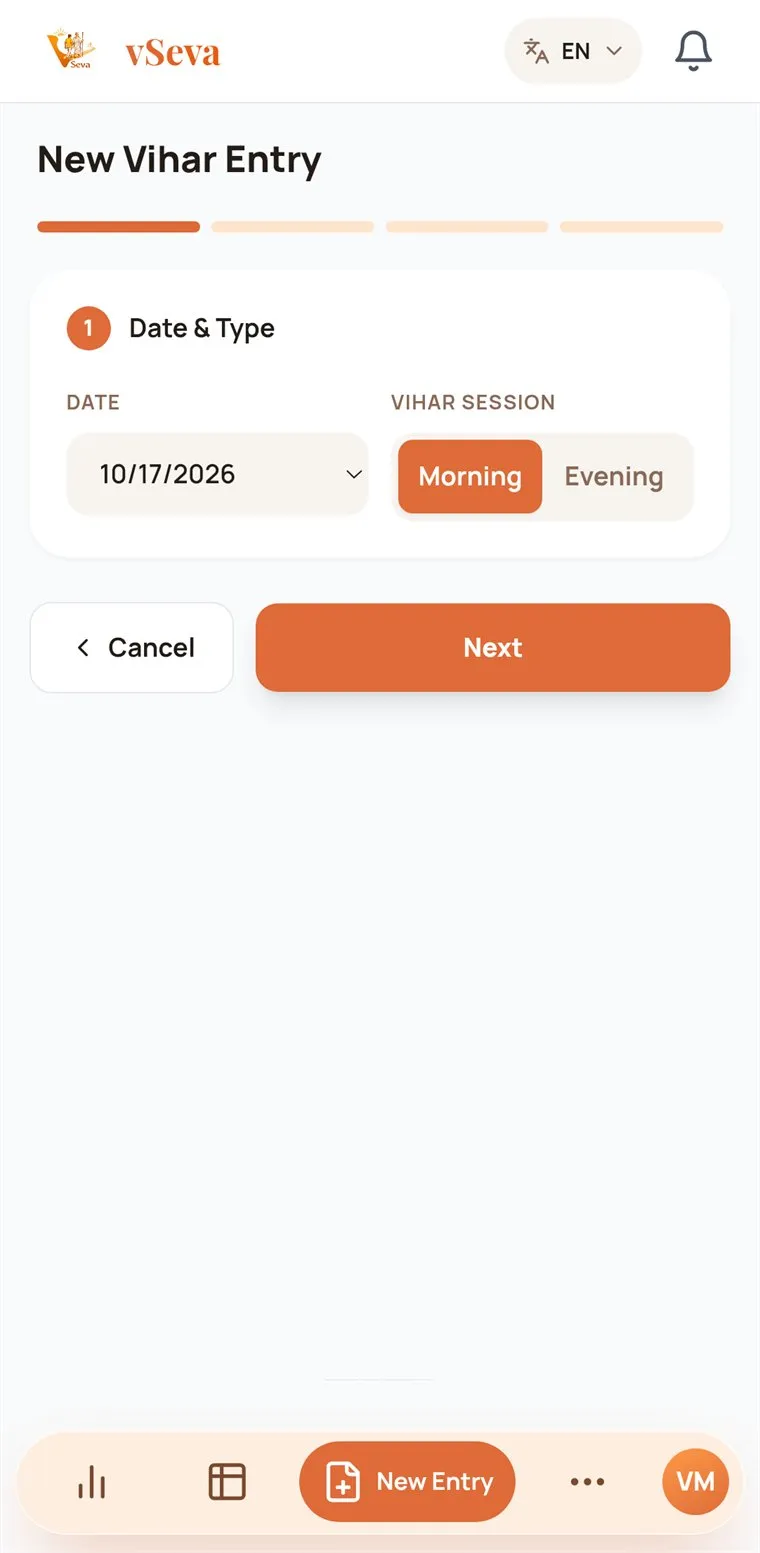
  1. New Vihar Entry, step 1: date and Vihar session

    1Date & session

    Today by default; Morning or Evening.

  2. New Vihar Entry, step 2: Sadhubhagwan count and the From and To route

    2Who and which route

    Sadhubhagwan or Sadhvijibhagwan, From and To. The distance appears.

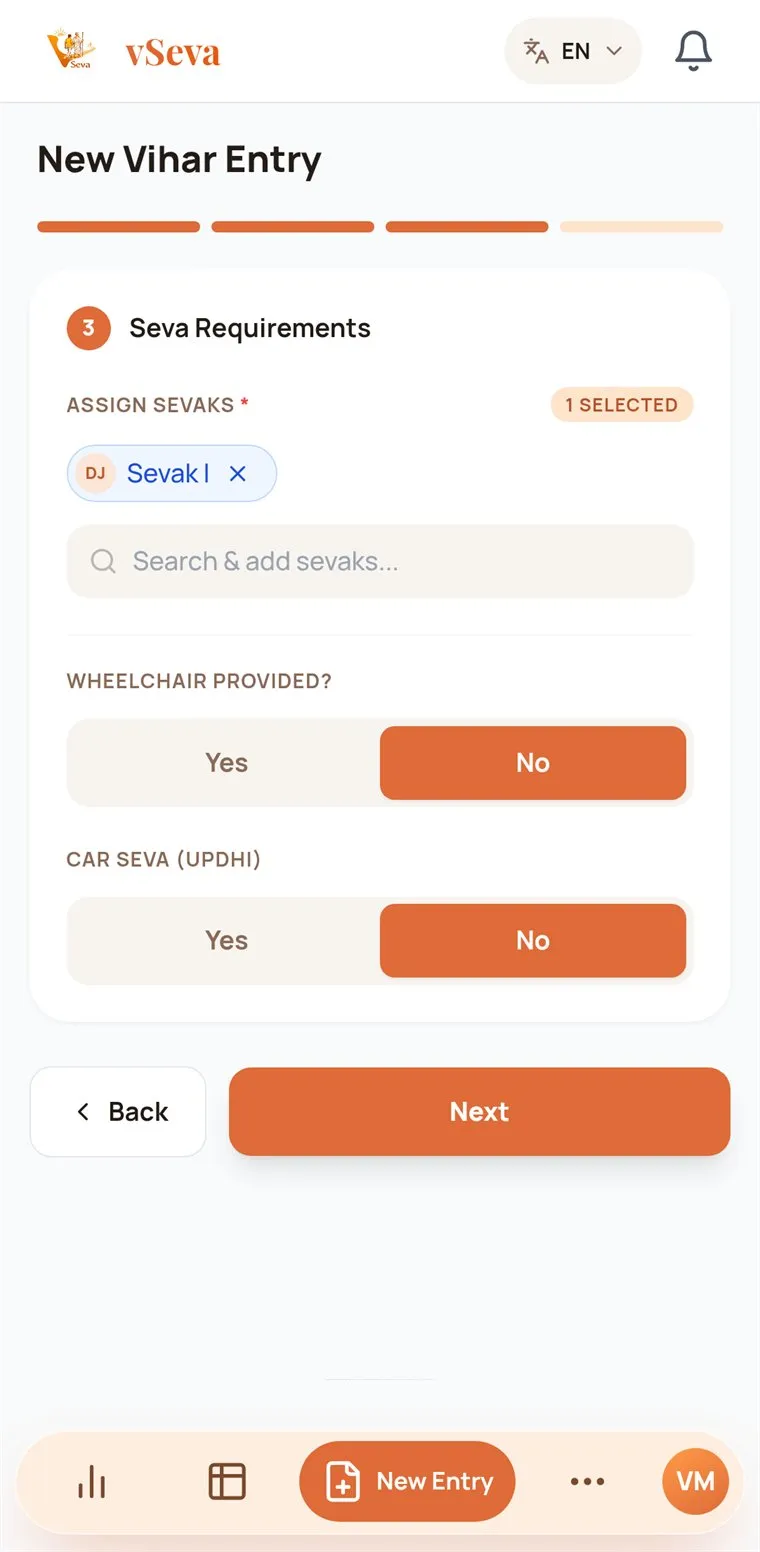
  3. New Vihar Entry, step 3: Sevaks who walked, wheelchair and car Seva

    3Seva requirements

    Every Sevak who walked, plus wheelchair and car Seva.

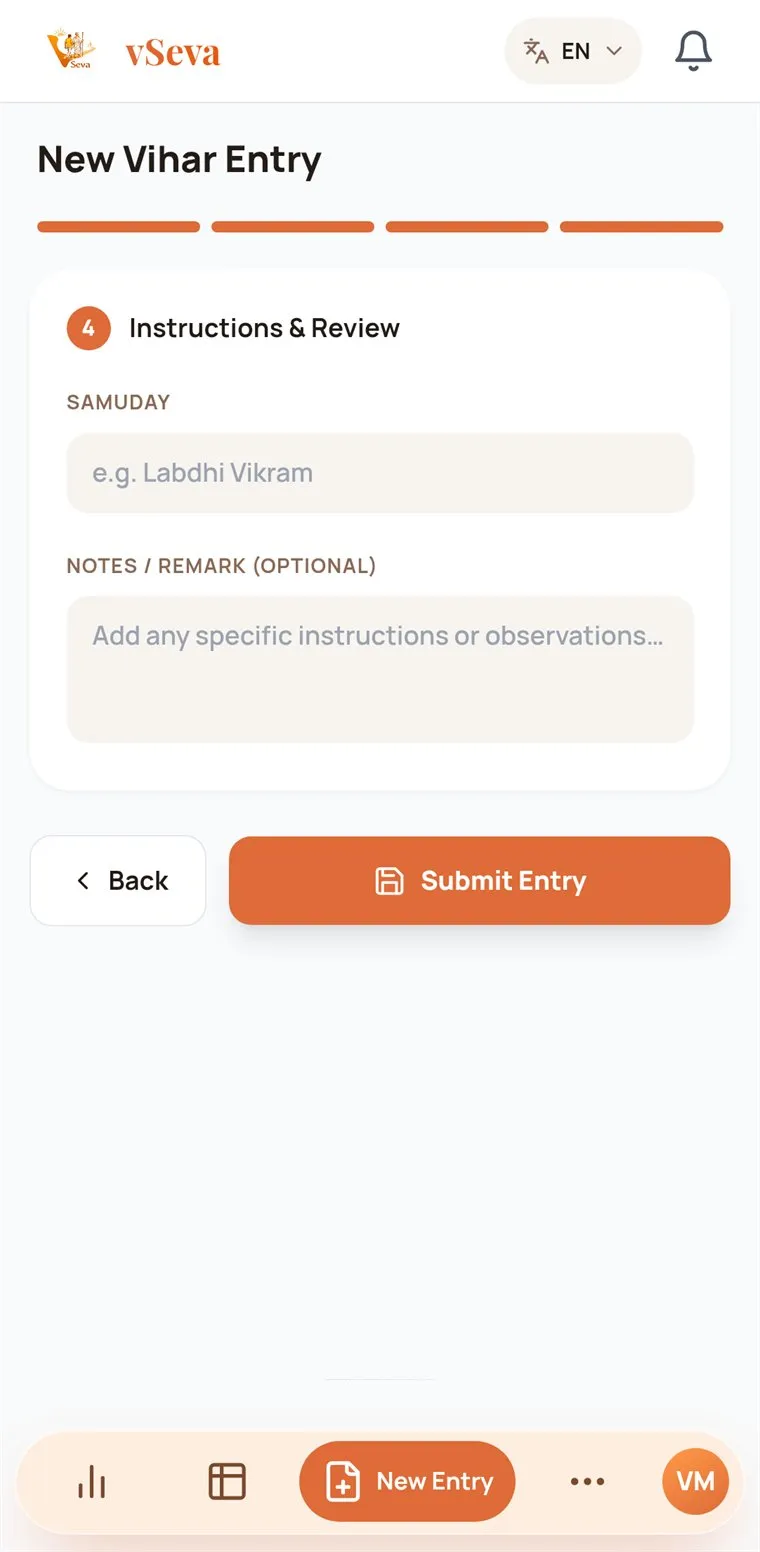
  4. New Vihar Entry, step 4: instructions, notes and Submit Entry

    4Review & submit

    Optional Samuday and notes, then Submit Entry.

Statistics and Sankalp

See the whole year at a glance.

Kilometres, Vihars, Sadhu and Sadhvi Bhagwant served, your rank, your streak and the week’s consistency. Group Analytics adds the longest Vihar, the top Sevaks and a monthly calendar.

Everything follows the Vihar Year, 14 October to 13 July, and a yearly Sankalp ring shows how close you are to your target.

Read about statistics
Group Analytics screen with total distance, Vihars, Group Sankalp and top Sevaks
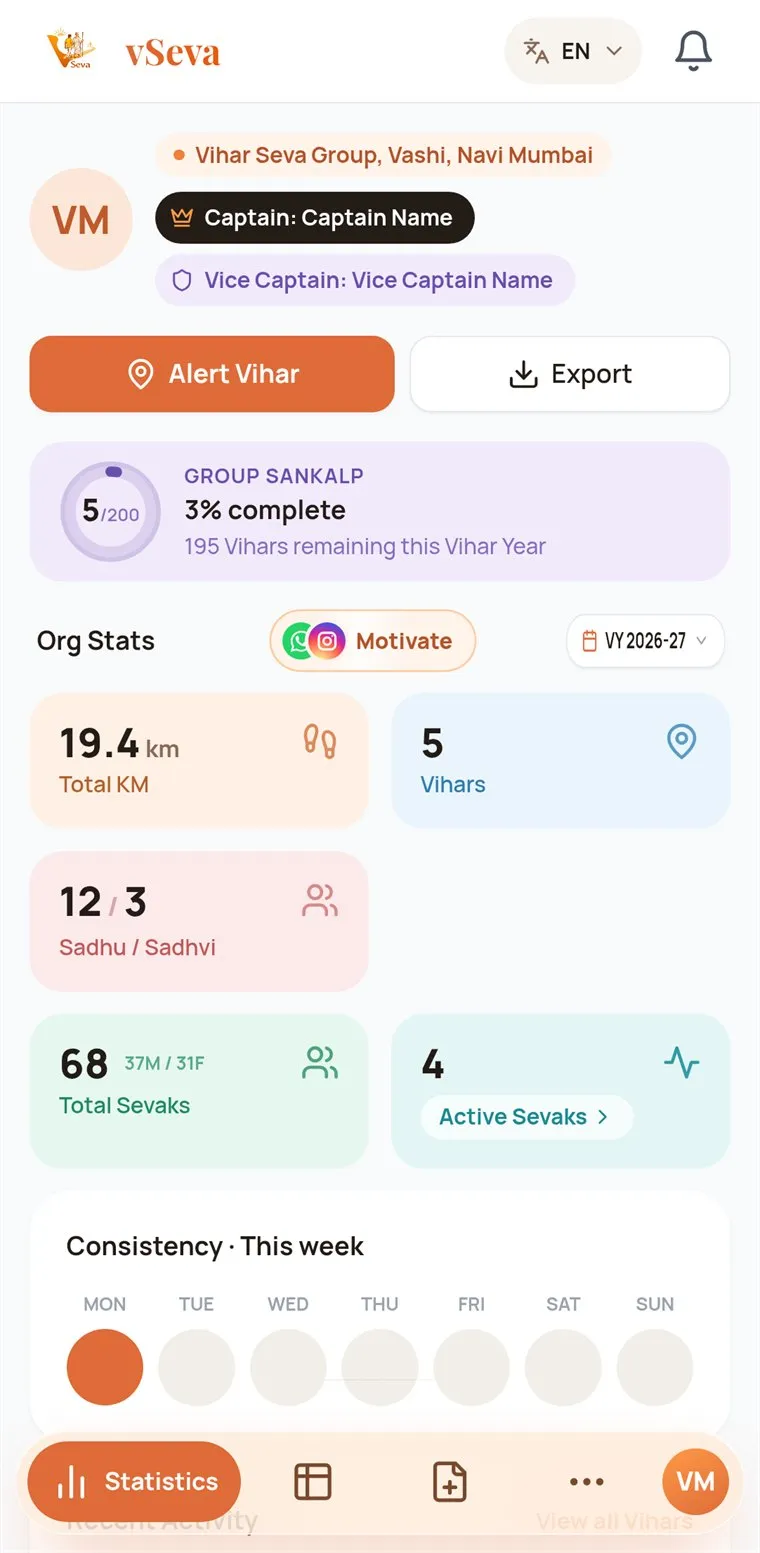
Captain dashboard with organisation stats and the weekly consistency strip

Approval workflow

The Captain approves, then it counts.

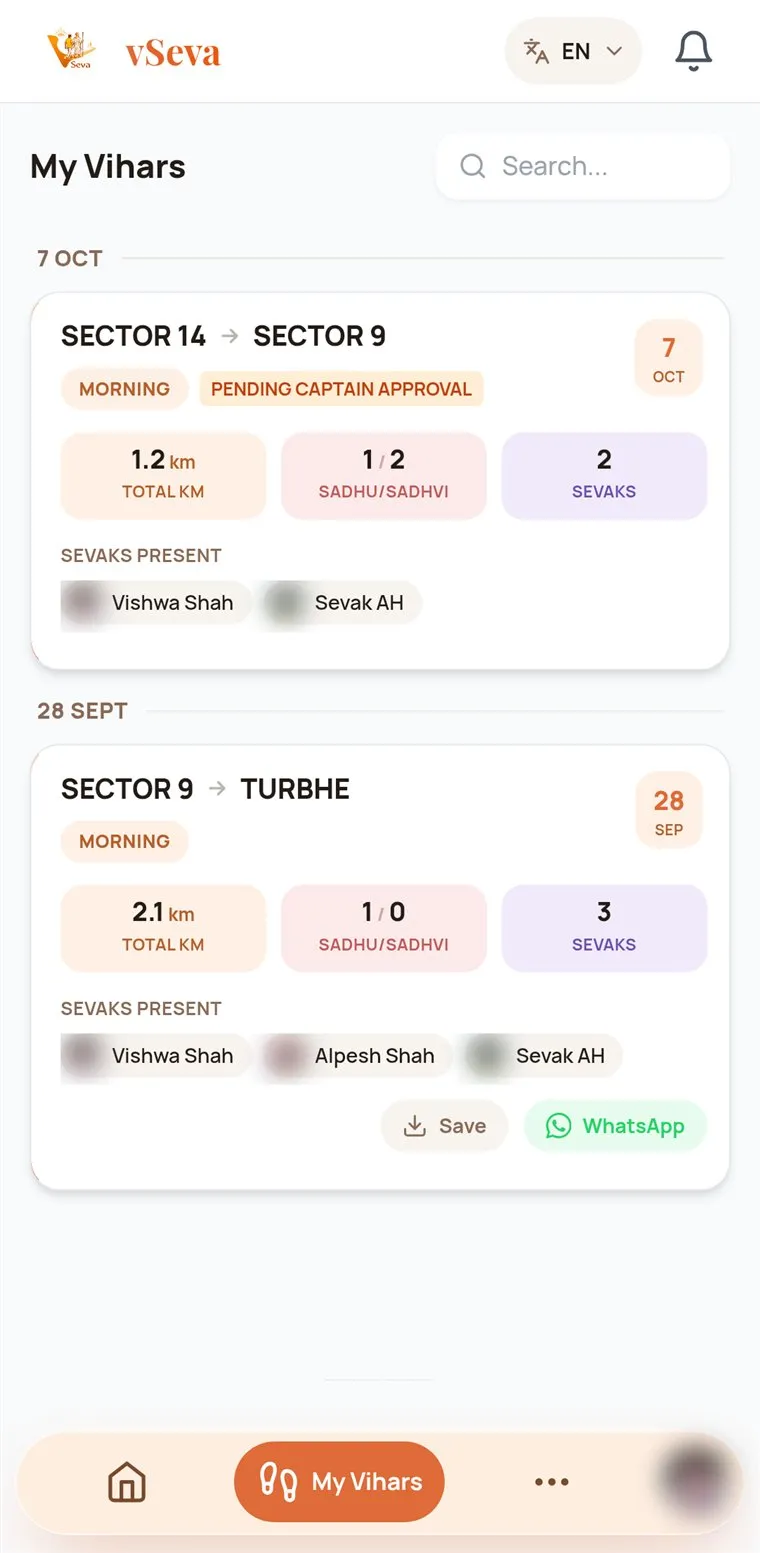
A Sevak’s Vihar shows as pending until the Captain approves, edits or rejects it, so every number on the dashboard has been checked.

Vihars the Captain records count straight away. A rejection lets the Sevak who sent it know.

How approvals work
My Vihars list showing an entry pending Captain approval

Important contacts

Help is one tap away.

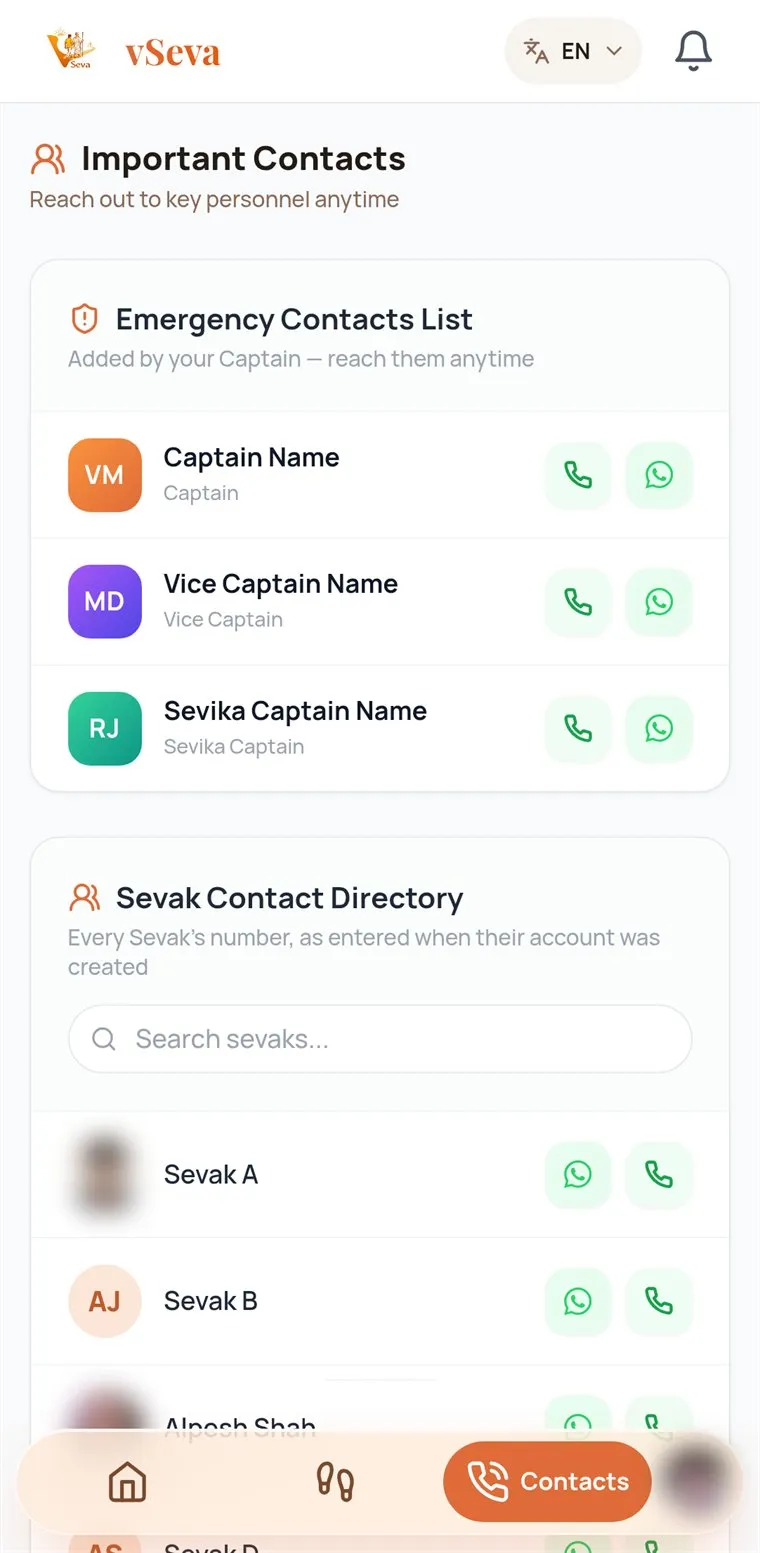
The Captain keeps an emergency contact list that every Sevak can see. The Sevak directory puts Call and WhatsApp next to every name, so nobody is searching for a number on the road.

Contacts and notifications
Important Contacts with the emergency list and the Sevak contact directory

Achievement sharing

Seva worth sharing.

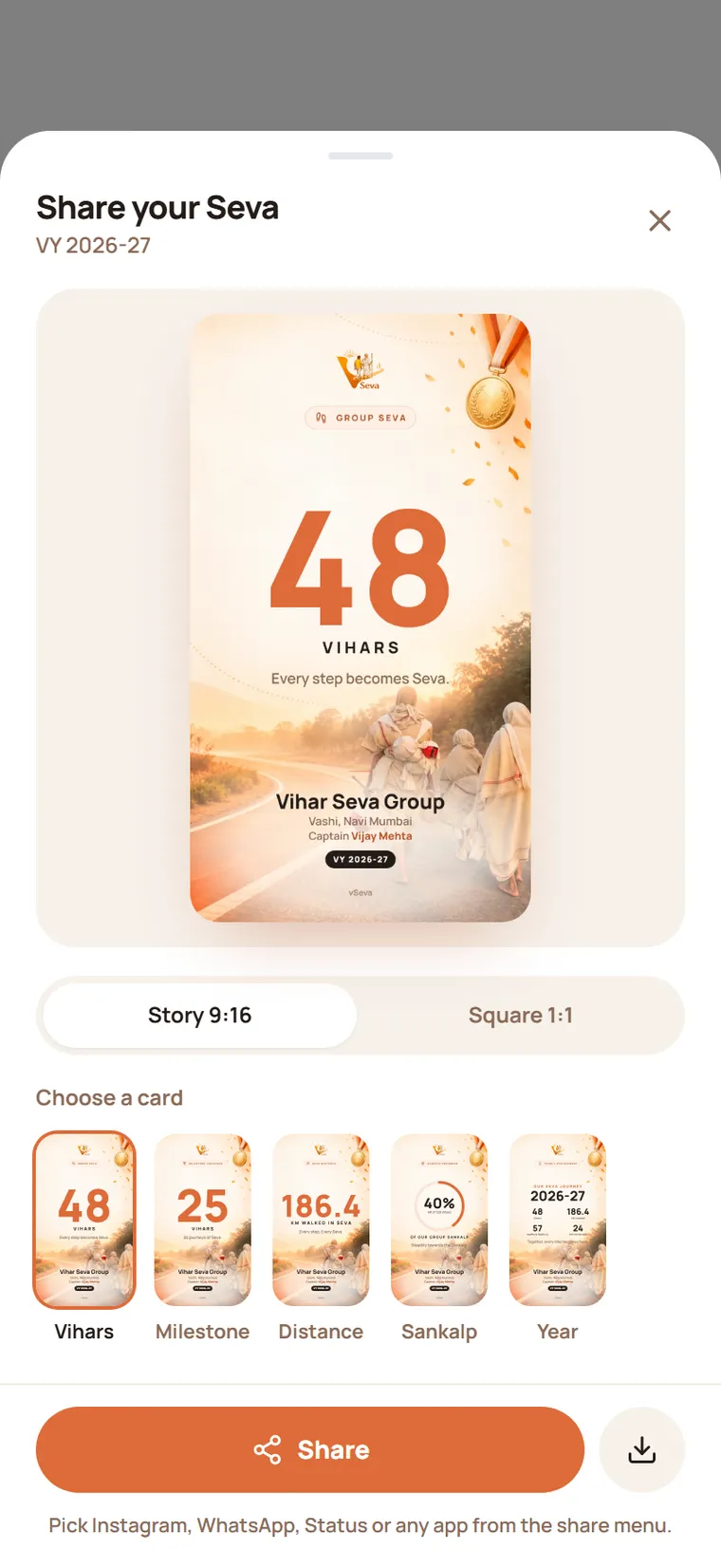
Turn a Vihar Year into a card worth posting: your Vihars, kilometres, Sankalp or the whole year, set on a dawn road with Maharaj Saheb walking ahead.

Five cards, in Story or Square, straight to WhatsApp Status and Instagram. Every Sevak also has a Vihar Seva ID card whose QR code opens their verification page.

Cards and the ID card
Share your Seva sheet with the Vihars card on a dawn-road photo, Story and Square formats and five cards
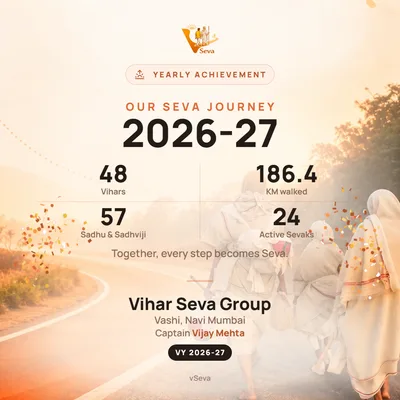
A Square Year card: 48 Vihars, 186.4 km, 57 Sadhu and Sadhviji, 24 active Sevaks

And around it

Everything else a group needs.

Routes and distance
The Captain keeps a list of From and To routes with kilometres, so distance fills itself in.
PDF and Excel reports
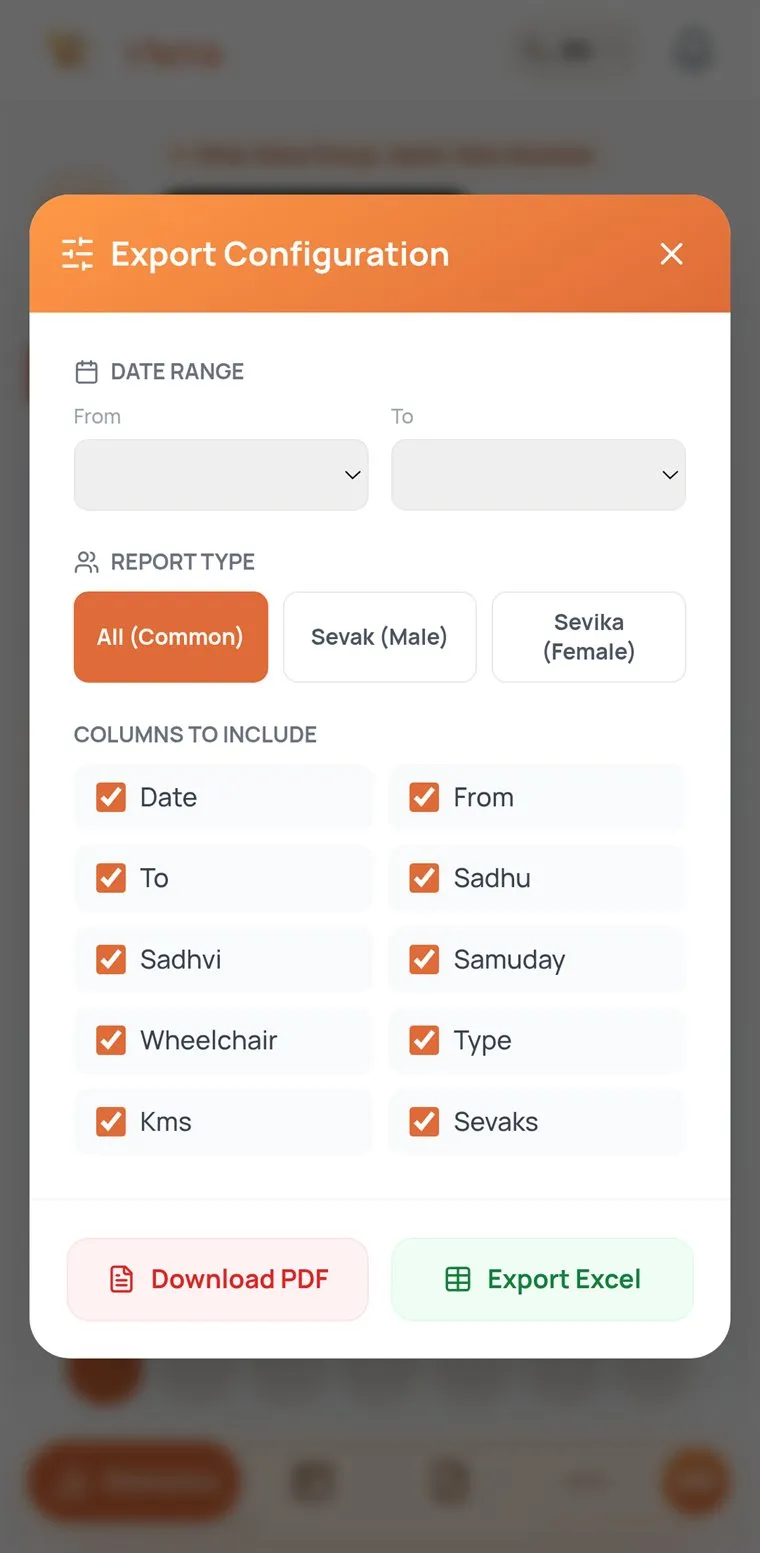
Pick a date range, report type and columns, then download.
Sevak management
Add Sevaks, share their login on WhatsApp in one tap, and see whose profile is still incomplete.
VChat
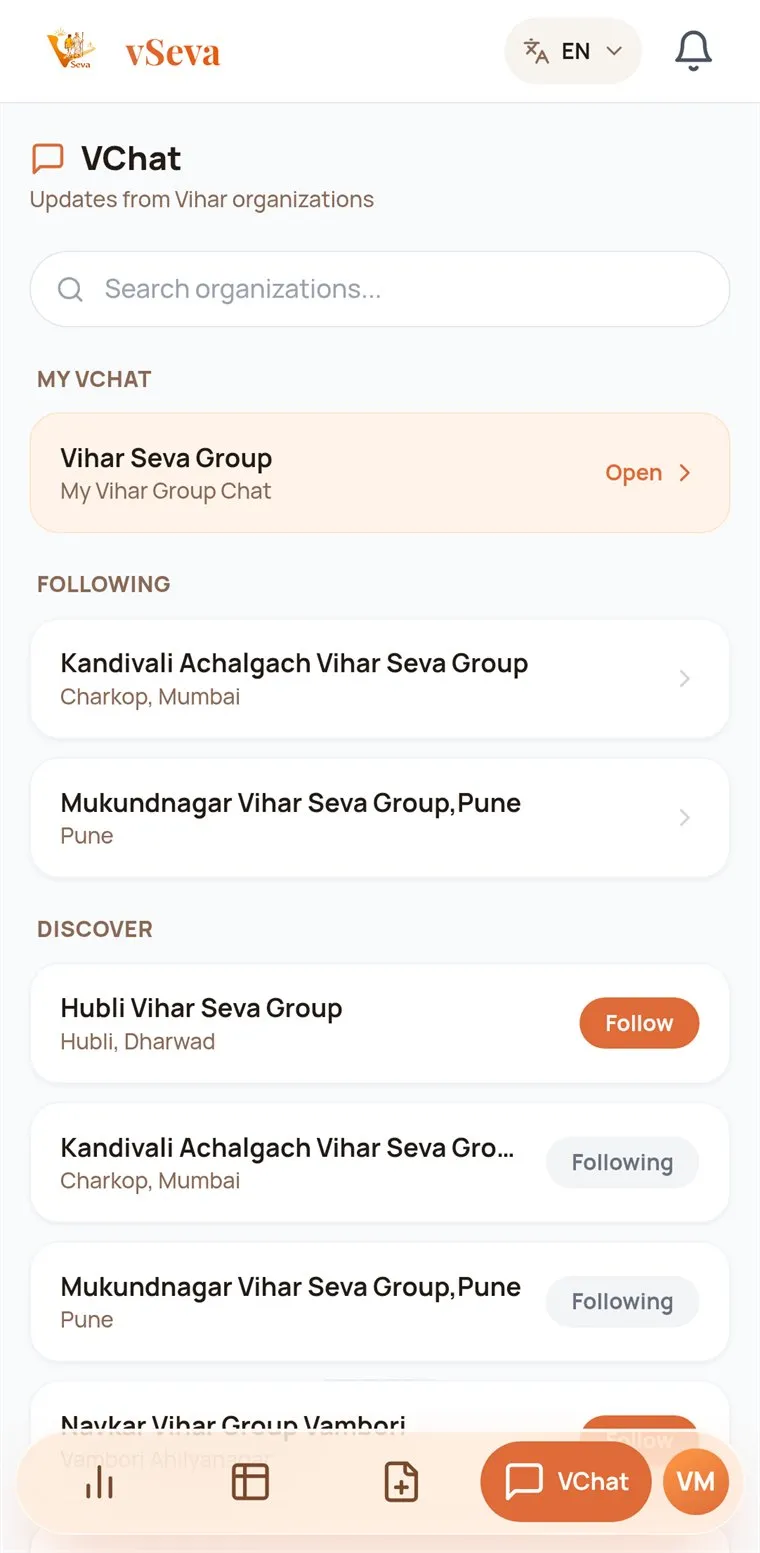
Your group’s own chat. Captains can follow other groups; messages stay for 30 days.
Incidents
Sevaks report what happened with a photo or video, and the Captain follows it up.
Works offline
Install it and vSeva opens even without internet, showing your last-synced Vihars and stats.
Three languages
English, ગુજરાતી and हिंदी. Switch any time from the top of the screen.

Reminders & Alerts

The right nudge, at the right time.

vSeva remembers so the Captain doesn’t have to: a kind word for Sevaks who have been away, a call to walk when a Vihar is coming up, and a wish on every birthday.

  • Vihar remindersEvery morning, 9 AM

    Sevaks who haven’t walked in a while get a gentle nudge. The Captain picks when (up to three, like 7, 8 and 15 days) and the words, or one of the ready lines.

  • Upcoming Vihar alertsInstantly, to everyone

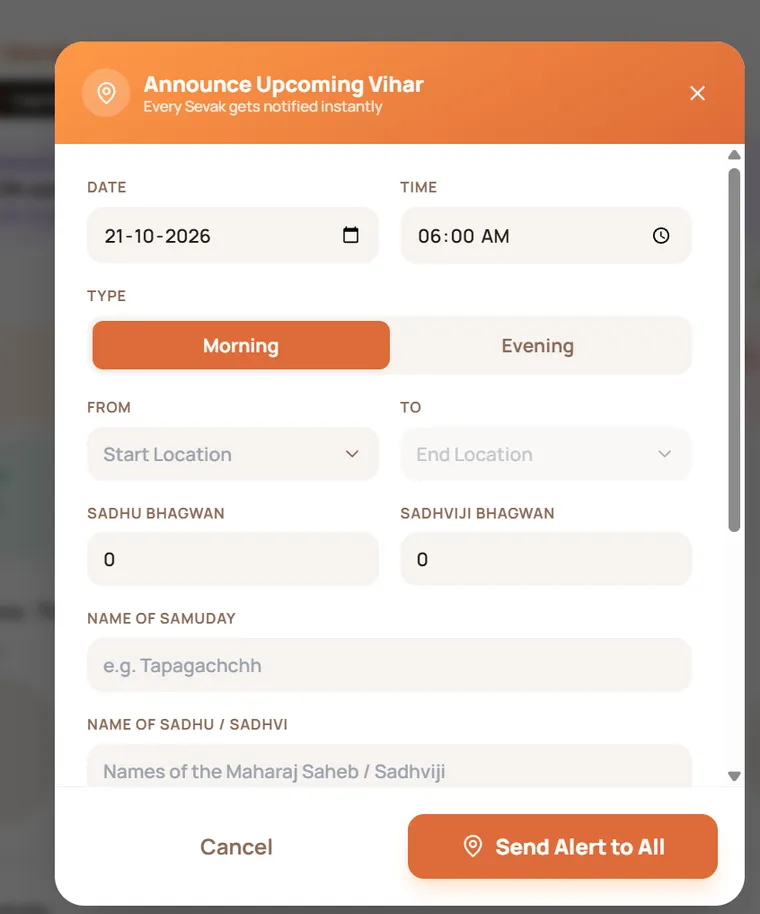
    Date, time, route and how many Maharaj Saheb and Sadhviji. One tap on Send Alert to All, and Sevaks answer with I’m Interested.

  • Birthday wishesEvery morning, 8 AM

    The whole group hears whose birthday it is today, so nobody misses the chance to send wishes.

Tapping any notification opens the right screen in the app.

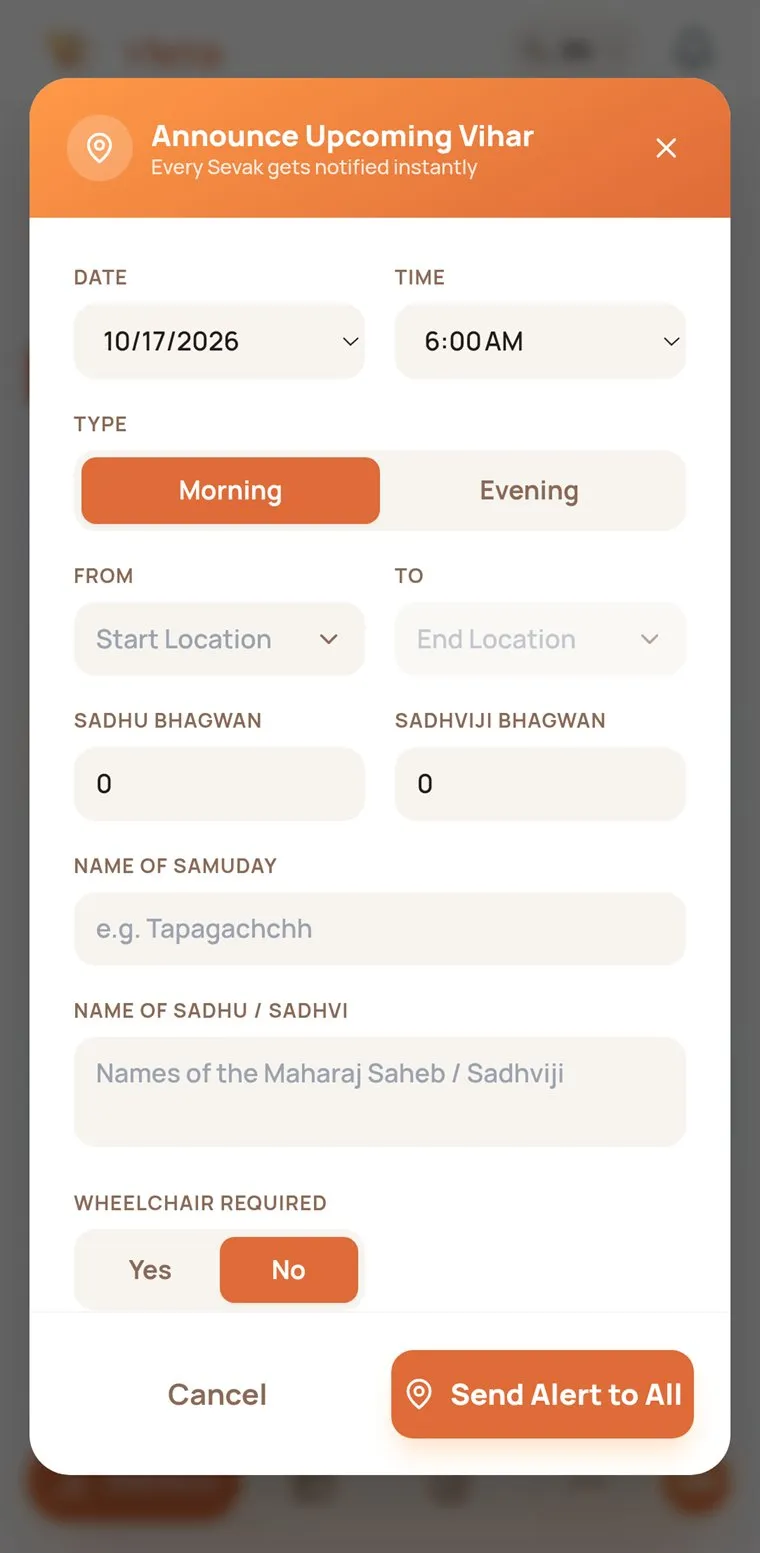
Announce Upcoming Vihar form with date, time, Morning or Evening, route and Send Alert to All
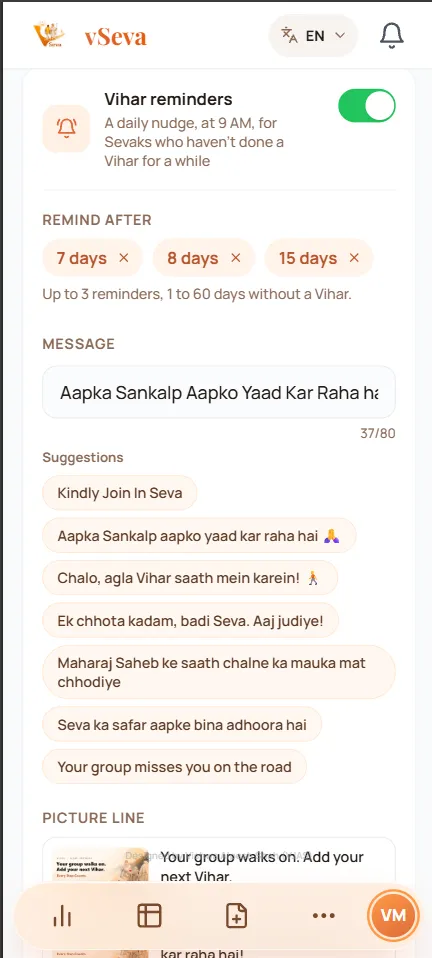
Vihar reminders settings: remind after 7, 8 and 15 days, the message and suggested lines
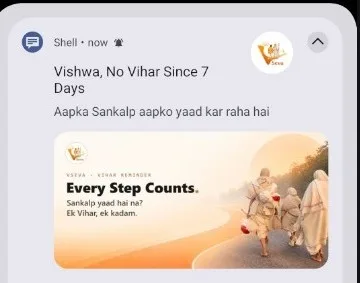
Notification: Vishwa, No Vihar Since 7 Days. Aapka Sankalp aapko yaad kar raha hai, with the Every Step Counts picture

Inside the app

The real screens.

Taken from the vSeva app. Names, numbers and photos are anonymised.

  • Captain dashboard with organisation stats and the weekly consistency strip

    Captain dashboard

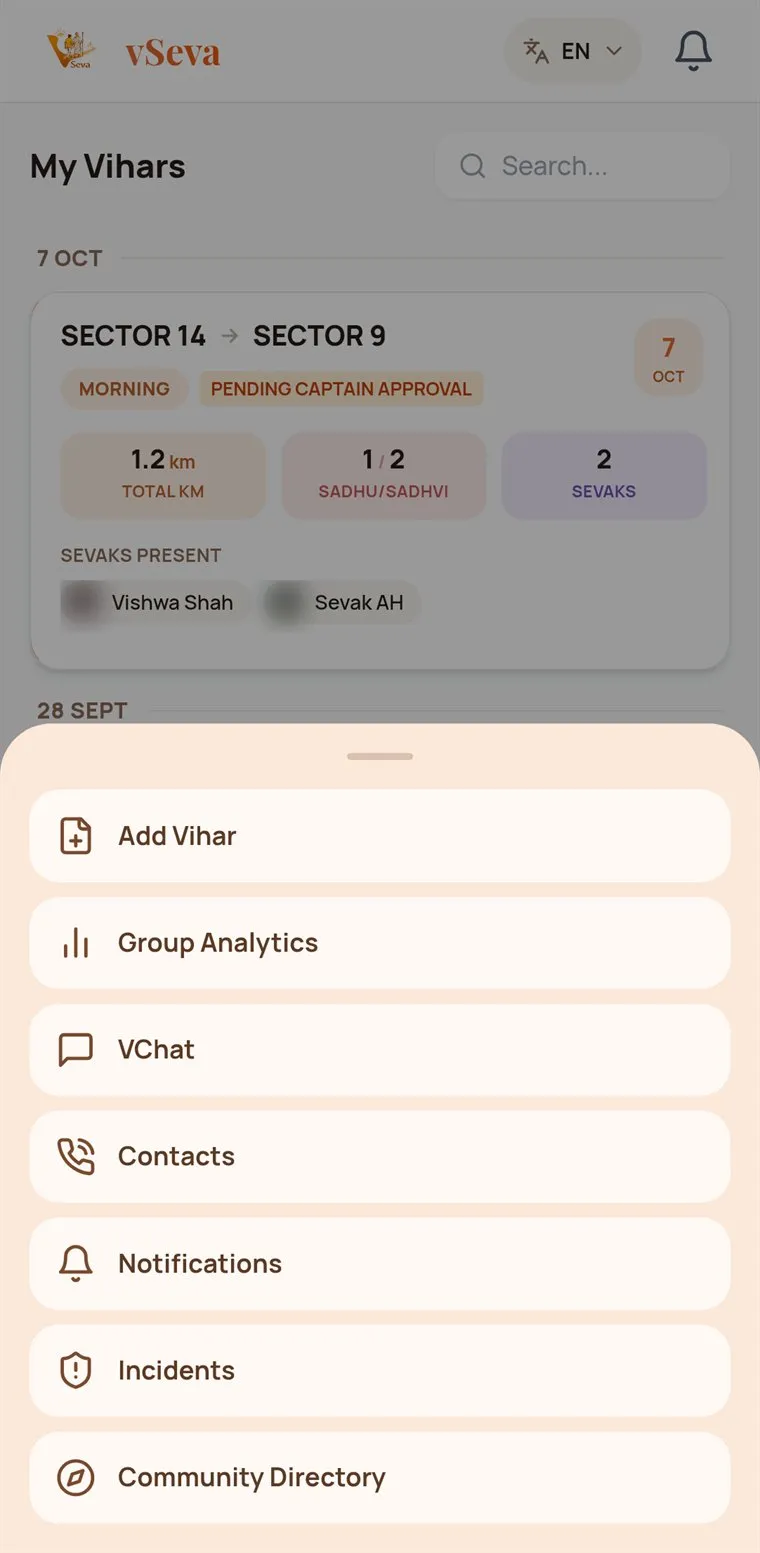
  • More menu for Sevaks: Add Vihar, Group Analytics, VChat, Contacts and more

    Everything in More

  • Announce Upcoming Vihar form for alerting every Sevak

    Announce an upcoming Vihar

  • Export configuration with date range, report type, columns, PDF and Excel

    Reports in PDF or Excel

  • VChat list with your group chat and followed groups

    VChat

  • vSeva Directory of temples, Upashrays and Vihar groups

    Community directory

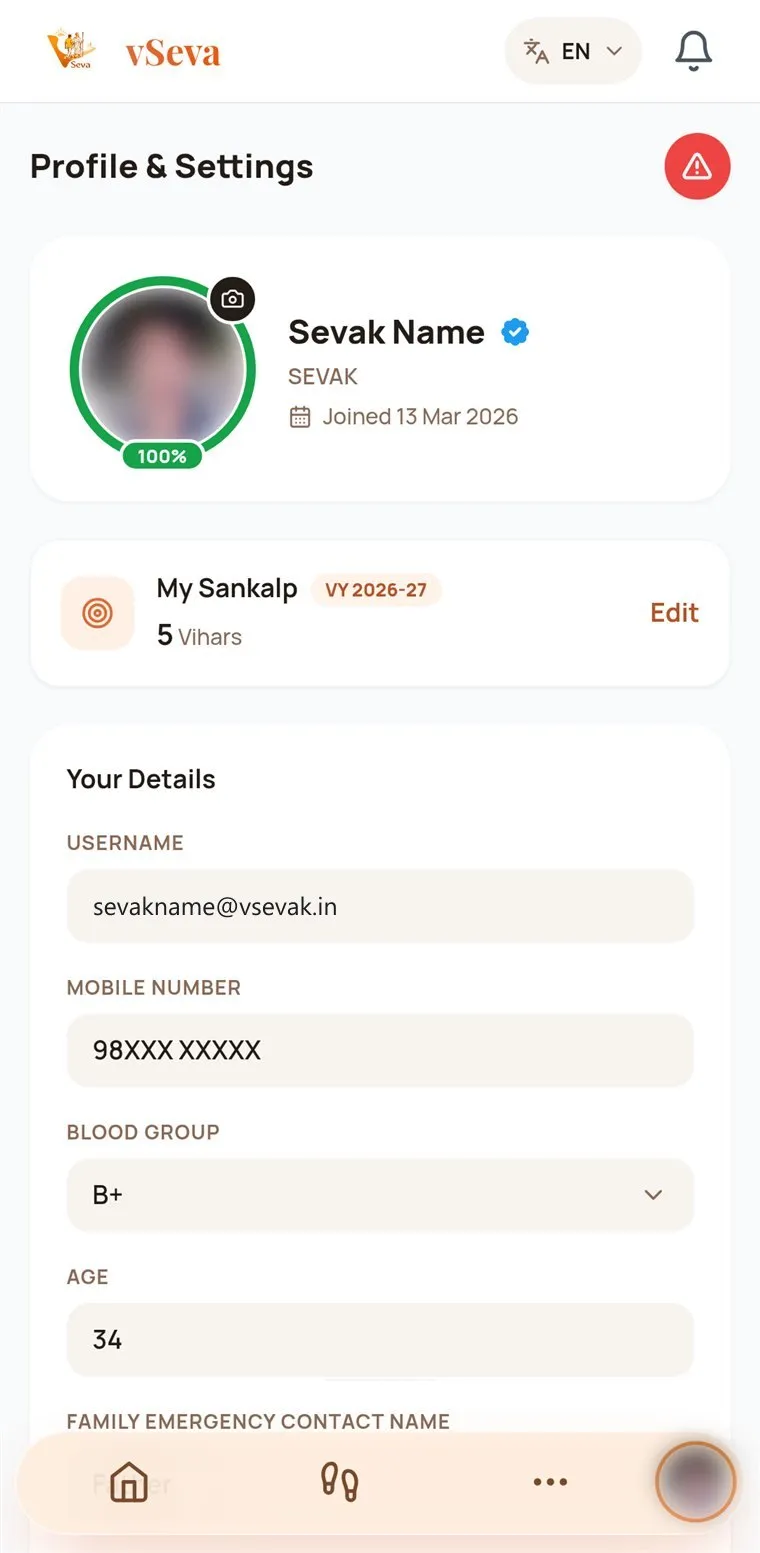
  • Profile and Settings with the 100% profile completion ring

    Profile completion

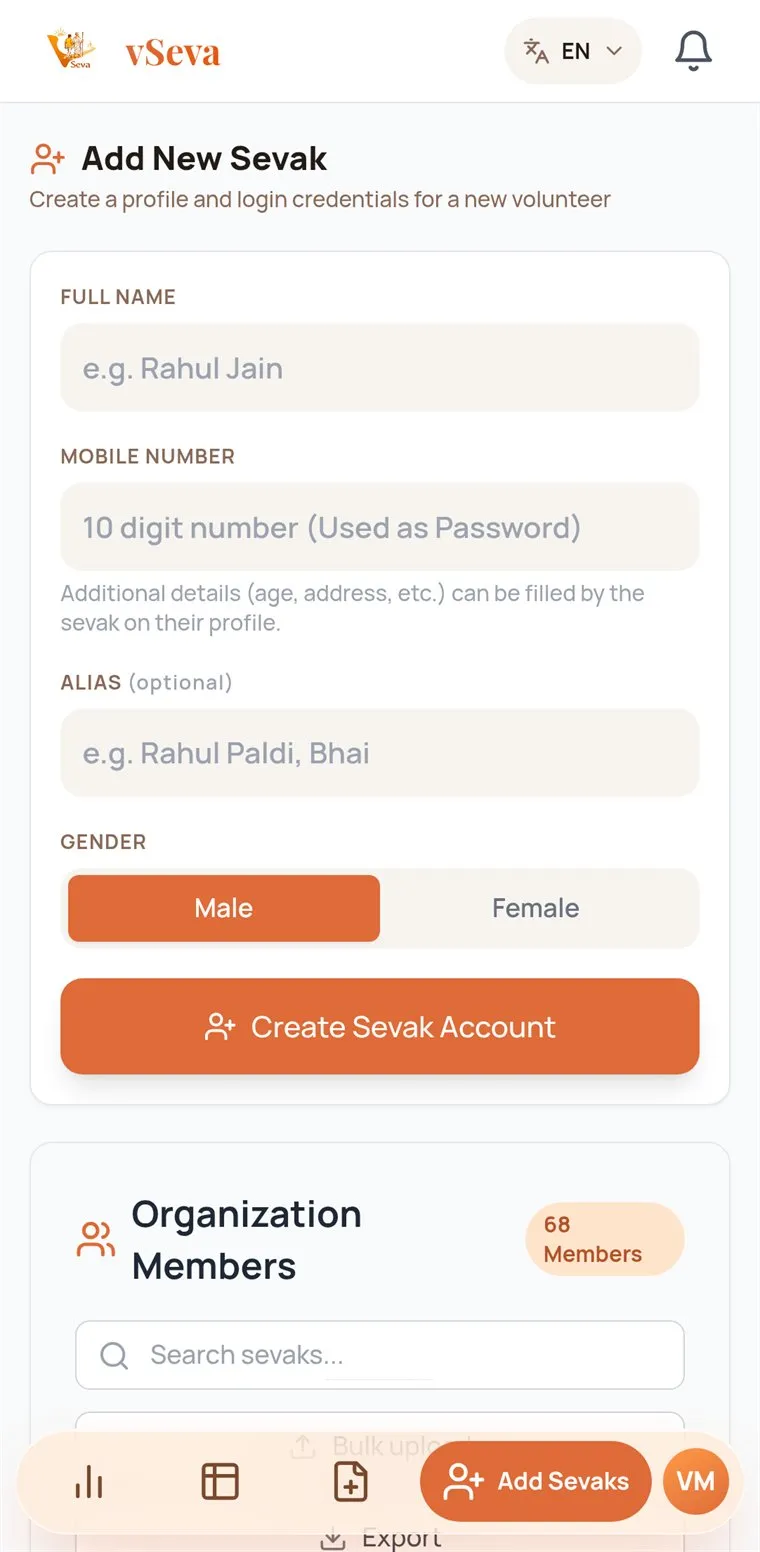
  • Add New Sevak form with full name, mobile number, alias and gender

    Add Sevaks

How it works

From the first request to the first report.

A group joins once. After that, the work is the same every day: walk, record, approve.

  1. 1

    Captain

    Request

    The Captain taps Create Captain Account and enters the group’s details.

  2. 2

    vSeva team

    Review

    Every group is verified by hand, usually within 24 to 48 hours.

  3. 3

    Captain

    Set up

    The Captain signs in and adds routes, emergency contacts and Sevaks.

  4. 4

    Sevak

    Sign in

    Each Sevak signs in with the username from the Captain and their mobile number.

  5. 5

    Sevak

    Record

    After a Vihar, one Sevak submits it in four steps for everyone who walked.

  6. 6

    Captain

    Approve & track

    The Captain approves it; stats, Sankalp and reports update for the group.

Get started

Two ways in: your group, and every Sevak in it.

Path A · For Captains

Bring your Vihar Seva group to vSeva.

Bring your organization’s Vihar records, Sevak coordination and Seva progress into one organized digital platform. Steps marked “vSeva team” are the ones we do for you.

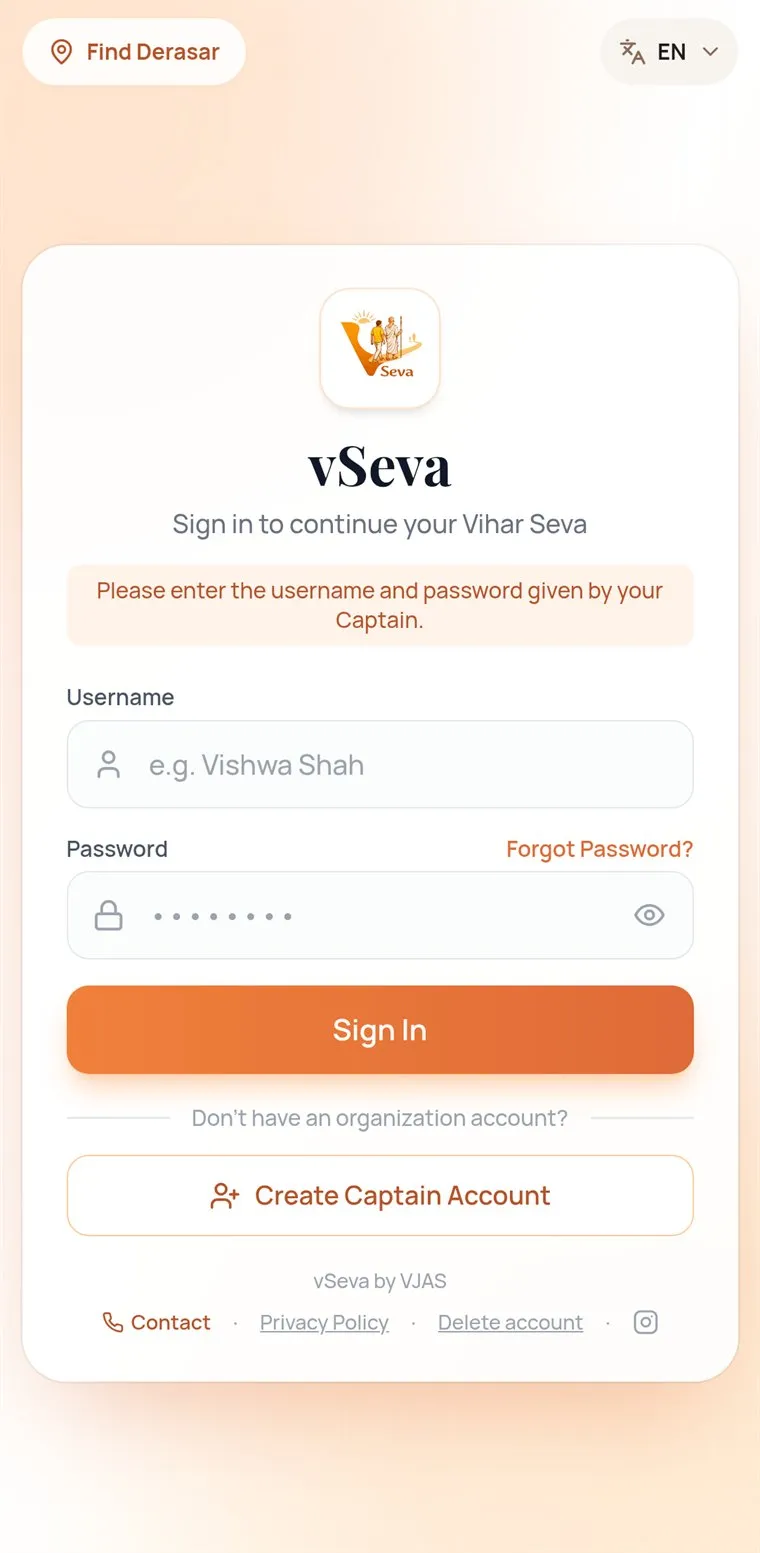
  1. vSeva sign-in screen with the Create Captain Account button

    Step 1 · You

    Create Captain Account

    On the vSeva sign-in screen, tap Create Captain Account.

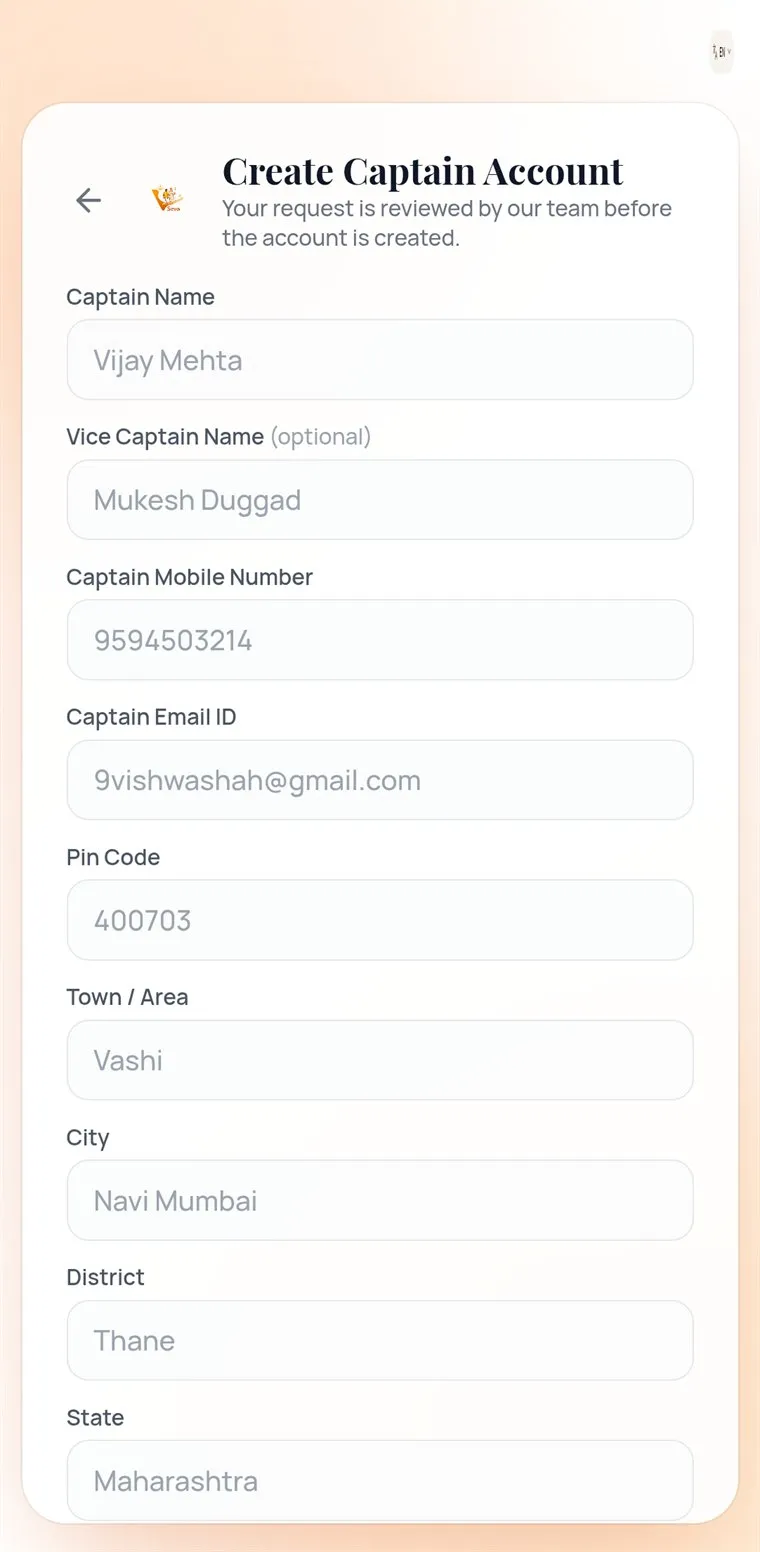
  2. Create Captain Account form asking for the Captain and group details

    Step 2 · You

    Enter your group’s details

    Captain, optional Vice Captain, mobile, email, group, Sangh and address. The PIN code fills in the area.

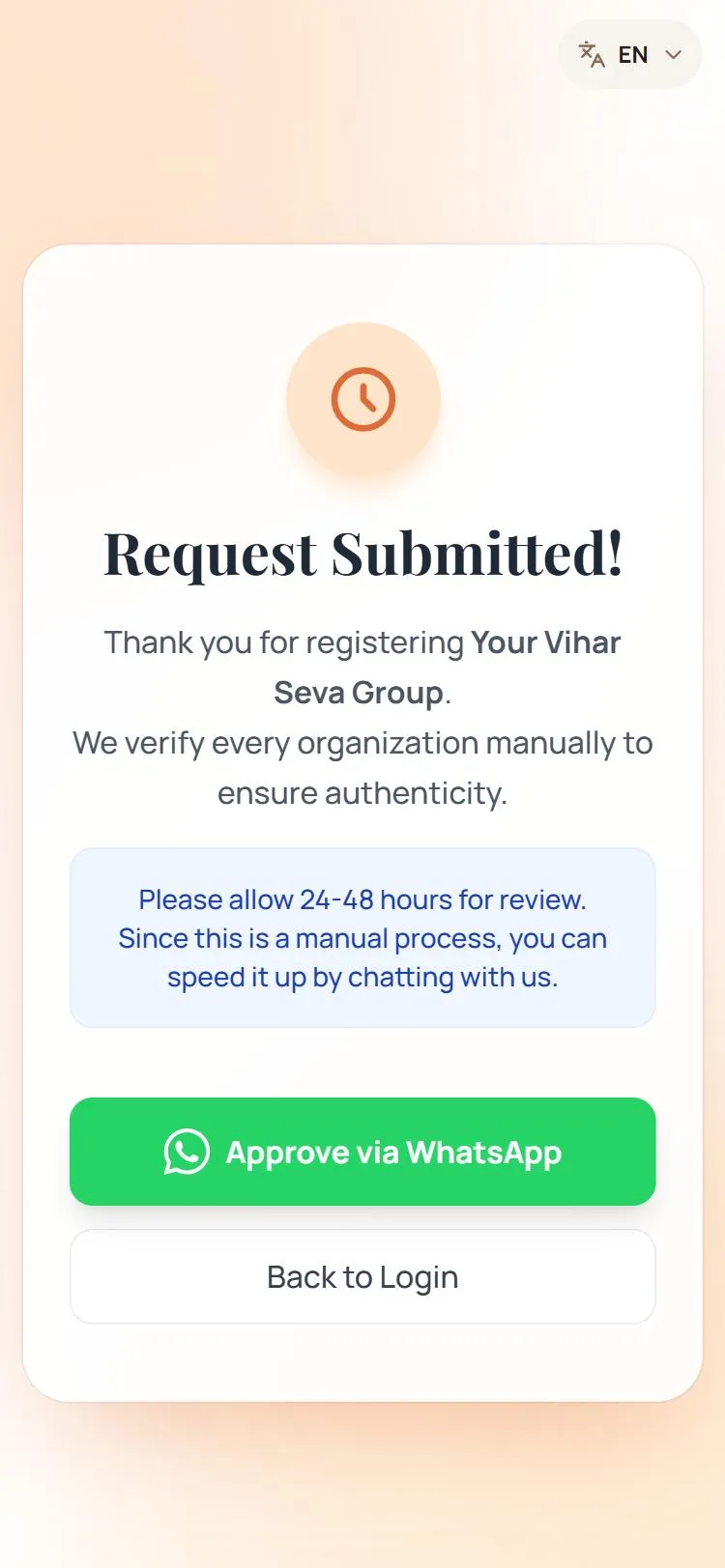
  3. Request Submitted screen: every organisation is verified manually within 24 to 48 hours

    Step 3 · vSeva team

    Wait for approval

    We verify every group by hand, usually in 24 to 48 hours. Approve via WhatsApp speeds it up.

  4. Captain dashboard with organisation stats and the weekly consistency strip

    Step 4 · You

    Sign in as Captain

    Your email is your username and your mobile number is your password. Check the group details in Profile.

  5. Add New Sevak form with full name, mobile number, alias and gender

    Step 5 · You

    Add routes and Sevaks

    Add routes in Manage Routes, then each Sevak in Add Sevaks, and share their login on WhatsApp.

  6. New Vihar Entry, step 1: date and Vihar session

    Step 6 · You

    Record the first Vihar

    Use New Entry. Vihars you record count straight away.

Path B · For Sevaks

Bring every Sevak into the journey.

Sevaks don’t sign up on their own: the Captain creates each login, so only your group’s members join your group.

  1. Add New Sevak form with full name, mobile number, alias and gender

    Step 1 · Your Captain

    The Captain adds you

    Full name, mobile number, an optional alias and gender. vSeva makes your username from your name.

  2. vSeva sign-in screen with the Create Captain Account button

    Step 2 · You

    Sign in

    Use the username your Captain shares on WhatsApp. Your password is your mobile number.

  3. Profile and Settings with the 100% profile completion ring

    Step 3 · You

    Complete your profile

    Blood group, date of birth, family emergency contact, occupation and address take the ring to 100%.

  4. Sevak home screen in vSeva with the My Sankalp ring and Your Stats tiles

    Step 4 · You

    Find your Home

    Your Sankalp ring and your stats, with Add Vihar right there.

  5. My Vihars list showing an entry pending Captain approval

    Step 5 · You

    Record and follow

    Submit a Vihar in four steps. It counts once your Captain approves it.

The people behind vSeva

Built with purpose. Growing through Seva.

Check your Vihar records, add a Vihar in a few taps, and follow your group’s analytics, Sankalp and reminders, all in one app.

Developed By

  • Vishwa Alpesh Shah
  • Alpesh Shah

The Team

  • Namya Mehta
  • Aagam Jain
  • Divya Mehta